Show connection or object details
You can show details for connections and objects that are connected by the connections. You can change attributes on the details page.
Open the model.
Display the Properties tab of the
 Details bar if it is not already open.
In the Responsibilities RA(S)CI category, move the mouse pointer over Informed. The
 More button is displayed.
Click
More > Show connection details or Show object details.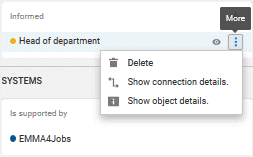
The detail page is opened.
If necessary, change the attribute values.
If you have changed attribute values, click Save. Your changes are saved and the page is closed.
If you want to leave the detail page without changing attributes, click Cancel. The page is closed.
You have used the details page.