Get information about objects
You can check which models use the object occurrences or you can display the relations of objects.
You can display where occurrences of an object or a connection are used and select the required occurrence using the navigation controls. Navigation to object occurrences is described below. The description also applies to connections.
Open the model.
Select an object in the model.
Click
 Details. The Details bar opens. If the object has additional occurrences in other models of the database, this is indicated by a database symbol under the object symbol.
Click the Occurrences tab.
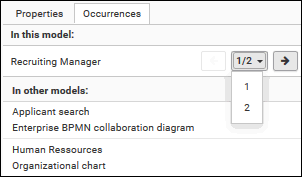
The occurrences of the selected object are listed. If more than one occurrence exists in the current model, the number of the selected occurrence and the total number of occurrences are displayed next to the object name.
Click the left or right arrow to navigate to the next occurrence in the model. The next occurrence is selected and its number updated.
To directly select an occurrence, expand the drop-down list and click the occurrence number.
To open a model that contains an occurrence of the selected object, click the name of the model in the In other models area. In the In other models area, all models are displayed to which you have at least read access. The model opens and the first occurrence of the object is selected.
You switched between the occurrences of an object using the navigation controls.
You can display the relation of selected objects.
Open the model.
Select the occurrence of the relevant object in the modeling area.
Click
Details. The Details bar opens.Click the Relations tab if it is not active yet.
The relations of the selected object are listed. The highlighting in front of the relationship indicates that the objects are connected directly.
If a relation has an occurrence (connection), you can navigate to the linked object.